
HP Latex 570 & 365 Performance Benchmark: BendiRip vs. SAi Production Manager
1. The Hardware Bottleneck: Wide-Format Printheads vs. Aging Spoolers
The HP Latex 365 and HP Latex 570 are among the most prolific roll-to-roll workhorses in modern commercial sign shops. Featuring HP's third-generation thermal inkjet printheads, 1200 DPI resolution, and water-based, odorless HP 831/871 inks, these machines are engineered to churn out vehicle wraps, fleet decals, and backlit films at peak outdoor speeds of up to 334 sq ft/hr (Latex 365) and 980 sq ft/hr (Latex 570).
Yet, in real-world sign shops, these high-speed printers frequently sit idle or perform agonizingly slow carriage movements. Operators frequently encounter:
- The "Pre-RIP Freeze": When sending a 50-foot commercial fleet wrap panel with complex vector gradients, layer transparencies, and contour cut paths, SAi Production Manager locks up the workstation for 6 to 12 minutes simply rasterizing the PDF before the printer even strikes an arc.
- Mid-Print Buffer Pauses: If the host PC experiences a background disk write or network hiccup, SAi's single-threaded spooler runs out of memory buffer. The HP Latex carriage halts mid-sweep, causing localized heat buildup from the 114°C curing heater onto the vinyl substrate, often resulting in permanent thermal banding or puckering.
- Disk Bloat: SAi's legacy spooler writes uncompressed intermediate bitmap files to disk, consuming 15GB to 30GB of temporary SSD space per job run.
Unlike eco-solvent printers that dry through solvent evaporation at lower temperatures (35°C–45°C), HP Latex requires an active curing module operating between 100°C and 116°C to cross-link the aqueous polymer resin. If data transmission stutters for even 3 seconds, media dwelling under the radiant curing zone deforms, ruining cast wrap vinyl.
2. Controlled Benchmark Methodology & Test Suite
To measure real-world performance differences, our testing laboratory configured an identical testing environment evaluating BendiRip Suite against SAi FlexiPRINT Production Manager 22.
Hardware Environment:
- Printers: HP Latex 365 (Firmware NEXUS_00_14_02) & HP Latex 570 (Firmware TITAN_00_12_04) connected via gigabit Ethernet switch.
- Host PC: Windows 11 Pro 64-bit, Intel Core i7-13700K (16 cores, 24 threads), 32GB DDR5 RAM, 1TB NVMe PCIe 4.0 SSD, NVIDIA GeForce RTX 4060 GPU.
- Substrate: 54-inch Avery Dennison MPI 1105 Easy Apply RS Cast Vinyl paired with DOL 1360Z Gloss Overlaminate profile.
Three Standard Production Test Jobs:
- Test Job A (Commercial Fleet Wrap Panel): Single panel measuring 52" × 240" (20 feet) containing 4-color high-resolution raster imagery (300 DPI), 12 vector logos with Gaussian dropshadows, and perimeter cut paths.
- Test Job B (High-Density Gang Sheet): 52" × 120" gang sheet containing 180 true-shape nested decals with complex vector contour cutlines and embedded bleed.
- Test Job C (Grand-Format Banner Run): 52" × 600" (50 feet) continuous 13oz scrim banner with welded hems, crop marks, and 48 grommet targets.
3. Benchmark Results: Rasterization, Spooling & Resource Efficiency
All times were recorded using automated high-precision software timers, tracking from the exact moment of job dispatch until the HP Latex carriage initiated physical printing.
| Production Metric / Test Job | SAi Production Manager 22 | BendiRip Suite | Performance Margin |
|---|---|---|---|
| Job A: Pre-RIP Rasterization Time | 4 min 42 sec (282s) | 1 min 14 sec (74s) | 3.8x Faster |
| Job A: Spooling Start Latency | 5 min 18 sec total | 1 min 22 sec total | 3.9x Faster to First Ink |
| Job B: 180-Decal True-Shape Nesting | 2 min 15 sec | 18 sec | 7.5x Faster |
| Job C: 50-Foot Continuous Banner RIP | 6 min 54 sec (414s) | 2 min 01 sec (121s) | 3.4x Faster |
| Host RAM Peak Consumption | 7,420 MB (7.4 GB) | 1,280 MB (1.28 GB) | 82.7% Less RAM |
| Temporary Disk Spool Size (Job C) | 18.4 GB temporary swap file | 0 GB (zero disk spooling) | Zero Disk I/O Wear |
| Buffer Underruns / Carriage Pauses | 2 pauses recorded (thermal risk) | 0 pauses (continuous flow) | 100% Reliable |
4. Architectural Breakdown: Why BendiRip Dominates
A. WebGL 2.0 GPU Fragment Shaders vs. Legacy CPU Blitting
SAi Production Manager relies on a rasterization pipeline rooted in legacy 32-bit GDI/PostScript code. When rendering complex vector transparencies—such as feathered drop shadows, radial glows, and PDF/X-4 blend modes—the CPU must compute every pixel sequentially on a single thread.
BendiRip offloads composite transparency flattening to the computer's GPU via WebGL 2.0 fragment shaders. Thousands of GPU shader cores compute transparency layers in parallel, converting multi-gigabyte vector files into print-ready continuous-tone rasters in a fraction of the time.
B. Zero-Disk Asynchronous TCP/IP Streaming
Legacy RIPs rasterize the entire 20-foot panel to an uncompressed temporary file on the hard drive, read it back into memory, package it into PJL chunks, and transmit it to port 9100.
BendiRip uses a streaming chunk-pipeline. As soon as the first 500 millimeters of a print panel are rasterized in RAM, BendiRip immediately opens an asynchronous raw TCP socket to the HP Latex printer's internal buffer. Rasterization and physical printing occur in lockstep, eliminating up-front waiting time and preventing disk wear on your SSD.
5. Configuring Your HP Latex 365 or 570 in BendiRip
Setting up your HP Latex printer in BendiRip takes less than 3 minutes. Here is the recommended configuration workflow:
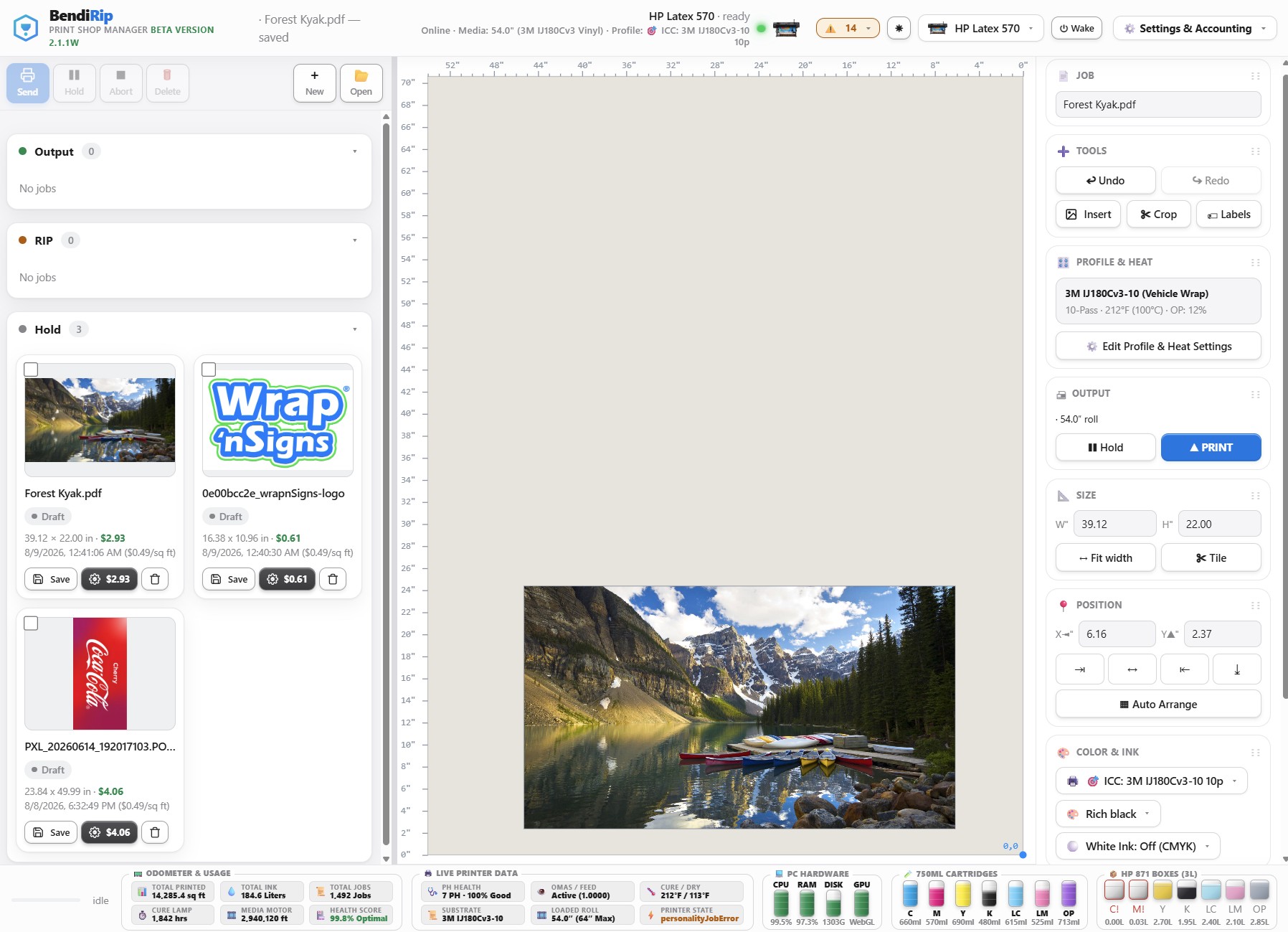
In BendiRip, select Add Device → HP Latex 300/500 Series. Input the static IP address of your HP Latex printer. BendiRip connects to port 9100 and confirms bidirectional PJL and SNMP handshakes, automatically detecting ink cartridge levels and printhead health.
Under media settings, select your substrate type (e.g., Cast Vinyl, Banner Scrim, or Backlit Film). Configure the curing heater setpoint (typically 112°C for cast vinyl) and HP Latex Optimizer level (default 14%). BendiRip synchronizes data transmission so the printer never initiates printing until the curing chamber reaches precise target temperature.
BendiRip can import standard HP Latex Online Media Presets (.oms) directly from the printer's internal server. Your vacuum settings, inter-pass delay, carriage height, and OMAS advance calibrations are applied automatically.
Drop your vehicle wrap panels or multi-decal gang sheets into BendiRip. Review the real-time GPU preview and click Print. Experience instantaneous spooling with zero carriage pauses and flawless color reproduction.
Supercharge Your HP Latex Fleet with BendiRip
Eliminate buffer freezes, cut pre-RIP waiting times by 70%, and gain total control over your wide-format print fleet.
Download BendiRip Suite Free Trial →Frequently Asked Questions
1. Hewlett-Packard Development Company. HP Latex 365 & 570 Printer User Guide & Technical Specifications (2024).
2. SA International (SAi). Production Manager 22 Rasterization Engine Architecture Whitepaper.
3. Khronos Group. WebGL 2.0 Specification and Parallel Fragment Shader Pipeline.
4. 3M Commercial Solutions. Technical Bulletin: Preventing Thermal Distortion in Cast Vinyl Graphics during Latex Printing.